There is a TMS tile data source and I need to “simulate” a WMTS service from it. How can this be done?
In this situation there are actually ready-made infrastructures or “wheels” to solve the problem, such as various map servers. In the .NET ecosystem there are open‑source tools like tile-map-service-net5. The reason this is still a problem here lies in two constraints:
- The client in use does not support loading XYZ/TMS format data; it can only load WMS and WMTS format data.
- The data used is already tiled in a TMS structure.
- The client cannot conveniently depend on an external map server.
Imitating the resource URLs
Some internet maps we’re familiar with all use XYZ or TMS methods, such as OSM, Google Map, Mapbox, etc. From earlier raster tiles to today’s more common vector tiles, if you want to use TMS to “imitate” WMTS request formats, you first need to understand their differences.
XYZ (slippy map tilename)
- 256×256 pixel images
- Each zoom level is a folder, each column is a subfolder, and each tile is an image file named by row
- Format like
/zoom/x/y.png - x ranges over (
180°W ~ 180°E), y ranges over (85.0511°N ~ 85.0551°S), Y‑axis goes from top to bottom.
You can see a simple XYZ tile example in the Openlayers TileDebug Example.
TMS
The TMS wiki on wikipedia doesn’t cover many details; osgeo-specification only describes some application details of the protocol. In contrast, the geoserver docs section on TMS is more pragmatic. TMS is the predecessor of WMTS and is also a standard developed by OSGeo.
A request looks like:
http://host-name/tms/1.0.0/layer-name/0/0/0.png
To support multiple file formats and spatial reference systems, you can also specify several parameters:
http://host-name/tms/1.0.0/layer-name@griset-id@format-extension/z/x/y
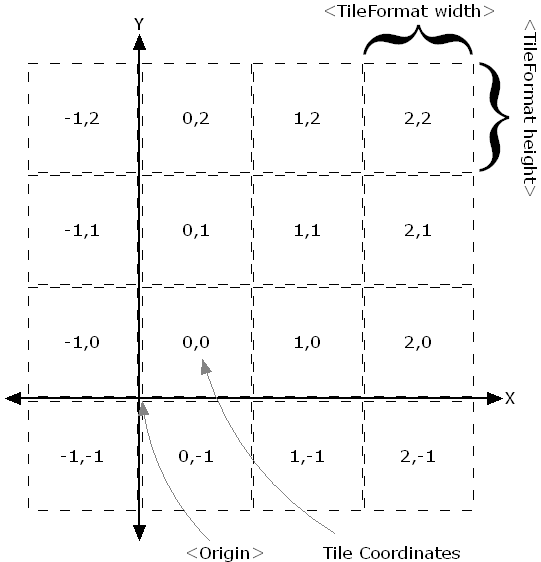
The tile grid in the TMS standard starts from the lower left corner, with the Y‑axis going from bottom to top. Some map servers, such as geoserver, support an extra parameter flipY=true to flip the Y coordinate, so it can be compatible with services whose Y‑axis goes from top to bottom, such as WMTS and XYZ.
WMTS
Compared to the two intuitive protocols above, WMTS is more complex and supports more scenarios. It was first published by OGC in 2010. In fact, even before that, after Allan Doyle’s 1997 paper “Www mapping framework,” OGC had already begun planning standards for web mapping. Before WMTS, the earliest and most widely used web map service standard was WMS.
Because each WMS request is generated according to the user’s map zoom level and screen size, the resulting map images differ in size. Back in the days when multi‑core CPUs were not yet widespread, this kind of on‑demand map rendering was very expensive, and improving response speed was difficult. So developers began trying to pre‑generate tiles, leading to many approaches, of which TMS was one; later WMTS emerged and started to see widespread use. WMTS supports KVP (key–value pair) and RESTful ways of encoding request parameters.
KVP looks like:
<baseUrl>/layer=<full layer name>&style={style}&tilematrixset={TileMatrixSet}}&Service=WMTS&Request=GetTile&Version=1.0.0&Format=<imageFormat>&TileMatrix={TileMatrix}&TileCol={TileCol}&TileRow={TileRow}RESTful looks like:
<baseUrl>/<full layer name>/{style}/{TileMatrixSet}/{TileMatrix}/{TileRow}/{TileCol}?format=<imageFormat>Since we’re dealing with raster tiles, we only need to find the mapping between XYZ and the tile matrix and tile row/column numbers:
- TileMatrix
- TileRow
- TileCol
Here the tile row/column indices start from the upper left, with the Y‑axis going from top to bottom.
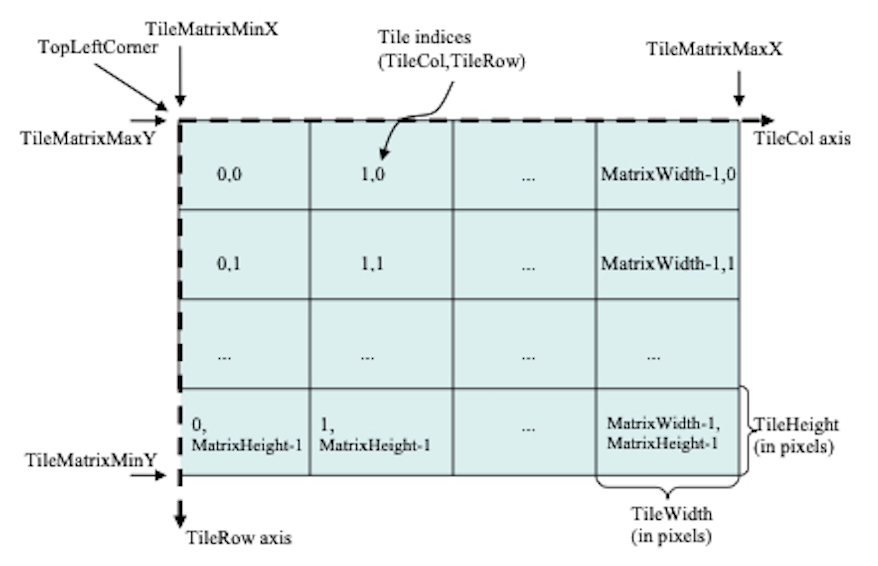
In this way, we can find the correspondence between TMS and WMTS parameters. Next is how to convert a TMS request into a WMTS request, as follows:
- TileRow = 2^zoom − 1 − y = (1 << zoom) − 1 − y
- TileCol = x
- TileMatrix = zoom
If we ignore other spatial references, the zoom level corresponds to the tile matrix, x corresponds to the tile column index, and y is flipped (because the origin directions are opposite).
Simulating a WMTS Capabilities document
The WMTS specification is detailed almost down to the hair, so various clients—whether the web‑based Openlayers or desktop clients like QGIS or Skyline—support directly parsing Capabilities documents and then use the contents to select layers, styles, and spatial references. So we also need to simulate a WMTS Capabilities document.
The structure of a Capabilities document
Examples of WMTS Capabilities documents can be found in opengis schema and Tianditu Shandong.
The Capabilities document has a lot of content; here are just some important parts (ignoring titles, contact info, etc.):
OperationsMetadata:    - GetCapabilities >> how to get the Capabilities document    - GetTile >> how to get tiles
Contents:    - Layer      - boundingBox >> the layer’s geographic extent      - Style      - TileMatrixSetLink >> spatial references supported by the layer      - TileMatrixSet >> spatial reference      - TileMatrixSetLimits >> zoom level range for the spatial reference      - TileMatrixLimits >> tile row/column range for each zoom level    - Style    - TileMatrixSet      - TileMatrix
The key parts are boundingBox, TileMatrixSetLimits, and TileMatrixLimits. You only need to compute these based on the layer’s spatial reference and zoom levels.
Computing the boundingBox is relatively simple; it’s just the geographic extent of the layer, so we won’t go into detail here.
TileMatrixSetLimits is also simple: it’s just the zoom level range for the layer’s spatial reference.
TileMatrixLimits is more complex. You can compute it only when the layer’s extent is relatively small; for global maps it’s unnecessary. It needs to be computed based on the layer’s spatial reference and zoom levels. Below is some pseudocode (4326 to 3857):
FUNCTION GetTileRange(minLon, maxLon, minLat, maxLat, zoom, tile_size = 256)
minLonRad = minLon * PI / 180maxLonRad = maxLon * PI / 180minLatRad = minLat * PI / 180maxLatRad = maxLat * PI / 180
tile_min_x = Floor((minLonRad + PI) / (2 * PI) * Pow(2, zoom))tile_max_x = Floor((maxLonRad + PI) / (2 * PI) * Pow(2, zoom))tile_min_y = Floor((PI - Log(Tan(minLatRad) + 1 / Cos(minLatRad))) / (2 * PI) * Pow(2, zoom))tile_max_y = Floor((PI - Log(Tan(maxLatRad) + 1 / Cos(maxLatRad))) / (2 * PI) * Pow(2, zoom))
// adjust tile range based on tile sizetile_min_x = Floor((double)tile_min_x * tile_size / 256)tile_max_x = Ceiling((double)tile_max_x * tile_size / 256)tile_min_y = Floor((double)tile_min_y * tile_size / 256)tile_max_y = Ceiling((double)tile_max_y * tile_size / 256)
RETURN  (tile_min_x, tile_max_x, tile_min_y, tile_max_y)
Generating a WMTS Capabilities document
Generate a minimal WMTS Capabilities document, fill in the key parts above, and then construct a RESTful‑style URL that points to the standard Capabilities document address.
Afterword
The above is a simple idea for converting TMS to WMTS; in practice there are many more details to consider, such as spatial reference conversion, zoom‑level conversion, tile row/column conversion, tile format conversion, and so on.
Along the way I also hit some pitfalls, which I actually find more interesting.
In the first part I quickly completed the y >> tileRow conversion by referring to the idea from tile-map-service-net5. The code is in WebMercator.cs. In fact, someone has asked this on StackOverflow and there are existing answers, but I still chose to look for the answer in software because it made me feel more confident.
The second part was a headache. I first simulated the resource URLs and built a simple XML, but it couldn’t be loaded directly by the target client. Naturally, I thought of testing with a standard service and then getting a Capabilities document to modify. I first wanted to test in Openlayers, which I’m more familiar with, and then modify the Capabilities document. Openlayers is quite flexible in how it loads WMTS; without a Capabilities document, you can directly access it via configuration parameters.
// fetch the WMTS Capabilities parse to the capabilitiesconst options = optionsFromCapabilities(capabilities, { layer: 'nurc:Pk50095', matrixSet: 'EPSG:900913', format: 'image/png', style: 'default'})const wmts_layer = new TileLayer({ opacity: 1, source: new WMTS(options)})Unfortunately, the tiles didn’t load, and the networks tab didn’t even show any requests. So I went to another WMTS‑related example, manually created a TileGrid, and converted the tile row/column indices to 3857. This time it could load.
const projection = getProjection('EPSG:3857')const projectionExtent = projection.getExtent()const size = getWidth(projectionExtent) / 256const resolutions = new Array(31)const matrixIds = new Array(31)for (let z = 0; z < 31; ++z) { // generate resolutions and matrixIds arrays for this WMTS resolutions[z] = size / Math.pow(2, z) matrixIds[z] = `EPSG:900913:${z}`}var wmtsTileGrid = new WMTSTileGrid({ origin: getTopLeft(projectionExtent), resolutions: resolutions, matrixIds: matrixIds})After confirming that the problem was with TileGrid, I first compared the TileGrid I generated with the one parsed by Openlayers from the Capabilities. I found that some fields in my generated TileGrid were empty, so I tested them one by one and finally discovered that when the two internal parameters fullTileRanges_ and extent_ are empty, the imagery can load.
Digging into the OL source code, I found that fullTileRanges_ and extent_ are used in getFullTileRange.
This means that when fullTileRanges_ and extent_ are empty, getFullTileRange returns an empty range.
And getFullTileRange is used in withinExtentAndZ, which is used to determine whether there are tiles for the current visible area of the layer. In other words, when fullTileRanges_ and extent_ are empty and TileRange cannot be obtained, withinExtentAndZ will always return true, so tiles will always load, which explains why it worked.
Conversely, the fullTileRanges_ and extent_ parsed from the Capabilities pointed to the wrong TileRange, causing withinExtentAndZ to always return false, so tiles would never load, which explains the failure.
I had finally found the cause, but I was misled by something else. In wmts.js, there is a comment in the constructor:
class WMTS extends TileImage { /** * @param {Options} options WMTS options. */ constructor(options) { // TODO: add support for TileMatrixLimits }}This made me initially think that fullTileRanges_ and extent_ were calculated based on the geographic extent (boundingBox), rather than based on TileMatrixLimits. So I went back to check the boundingBox again and confirmed it was correct before I began modifying TileMatrixLimits.
At first I thought TileMatrixLimits described the tile range for each zoom level, not the layer’s extent, so I didn’t pay attention to this parameter and took a detour.
Written in 2023: WMTS is no longer a new protocol; the OGC Tile API has already become an official standard. My understanding of WMTS is still half‑baked—quite embarrassing. 😅